Action method
All public methods of Controller class are called Action Methods. They are like any other normal method with the following limitations:
- The Action method must be public. Cannot be private or protected
- Action methods cannot be overloaded
- Action method cannot be a static method.
The following example of the action method is Index of the StudentController
class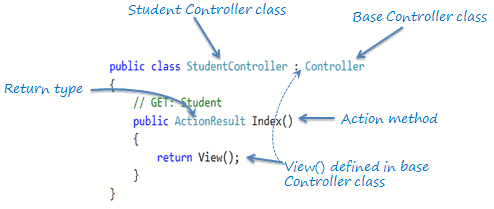
As you can see in the image above, Index method is a public method and it returns ActionResult using View() method. The View() method is defined in the Controller base class, returning ActionResult.
Default Action Method
Each controller has a default action method implemented in the RouteConfig class. The Index method is the default action method, implemented by default,
Default route:
routes.MapRoute(
    name: "Default",
    url: "{controller}/{action}/{id}/{name}",
    defaults: new { controller = "Home",
                    action = "Index",
                    id = UrlParameter.Optional
            });
However, you can change the default action name according to your requirements in the RouteConfig class.
ActionResult Method
MVC framework contains various result classes, which can be returned from an action method. There are result classes that represent different response types, such as html, file, string, json, javascript, etc. The following table lists all the result classes available in ASP.NET MVC.
| Result Class | Description |
|---|---|
| ViewResult | Returns HTML |
| EmptyResult | Returns nothing. |
| ContentResult | Returns a string |
| FileContentResult/ FilePathResult/ FileStreamResult | Returns the contents of the file |
| JavaScriptResult | Returns JavaScript script. |
| JsonResult | Returns a JSON usable in AJAX |
| RedirectResult | User redirect |
| RedirectToRouteResult | Redirect another action. |
| PartialViewResult | Returns HTML from Partial view |
| HttpUnauthorizedResult | Return error and HTTP Code |
The ActionResult class is a base class of all the result classes above, so it can be the return type of action methods that return any of the result types listed above. However, you can specify the appropriate result class as the action method's return type.
The Index() method of the StudentController in the image above uses the View() method to return a ViewResult (retrieved from ActionResult). The View() method is defined in the base Controller class. It also contains various methods, which automatically return the specific type of result as shown in the table below.
| Result Class | Description | Base Controller Method |
|---|---|---|
| ViewResult | Returns HTML. | View() |
| EmptyResult | Represents No response. | |
| ContentResult | Returns nothing. | Content() |
| FileContentResult, FilePathResult, FileStreamResult |
Returns the contents of the file |
File() |
| JavaScriptResult | Returns JavaScript script. | JavaScript() |
| JsonResult | Returns a JSON usable in AJAX | Json() |
| RedirectResult | User redirect | Redirect() |
| RedirectToRouteResult | Redirect another action. | RedirectToRoute() |
| PartialViewResult | Returns HTML from Partial view | PartialView() |
| HttpUnauthorizedResult | Return error and HTTP Code |
As you can see in the table above, View method returns ViewResult, Content method returns string, File method returns content of file, etc. Use the different methods mentioned in the table above, to return different types of results from an action method.
Action method parameters
Each action method can have input parameters like normal methods. It can be a primitive data type or a complex type parameter as in the example below.
Example: Action method parameters
[HttpPost]
public ActionResult Edit(Student std)
{
    // update student to the database

    return RedirectToAction("Index");
}

[HttpDelete]
public ActionResult Delete(int id)
{
    // delete student from the database whose id matches with specified id

    return RedirectToAction("Index");
}
 Points to remember :
- The public methods of the Controller are called Action methods.
- Action methods have limitations:
- The Action method must be public. Cannot be private or protected
- Action methods cannot be overloaded
- Action methods cannot be static methods
- ActionResult is the base class returned from the Action method.
- The Controller base class contains methods that return the appropriate result type, e.g. View(), Content(), File(), JavaScript() etc.
- Action methods can contain type parameters Nullable .
Did you find this article helpful?
Support the author so they can write more quality articles!